Finding a decent first aid kit for mountain biking is actually pretty tricky. I want a kit that can cover all eventualities.
Coming off at speed on forest single-track means potential cuts, bruises and breaks. Coming off when there's fresh cut logs and offcuts in your landing zone can mean potential punctures and major trauma.
I've recently got quite excited about first aid after completing the RNLI's casualty care course. That covers first aid with a few things thrown in from field medicine. Taking this into account I started looking for kit I should take on the trails with me, it needs to be relatively light and capable of dealing with the worst possible situations. That being the case I'd rather have fewer items to cover all eventualities.
Similarly I don't want to cock about cutting gauze, and using tape. My kit is designed to be applied very quickly.
So, what do I currently have in my kit?
Note: I'm in no way affiliated with SP Services, I just found that they were the easiest to order from.
Gloves - I have a couple of pairs of latex-free medical grade disposable gloves wrapped up in sandwich bags. So far I've only had to fix strangers I've run into on the trails. It's always a good idea to wear gloves. Not just so you don't catch something. You might not have time to clean _your_ hands. Wearing gloves provides a barrier that protects you both.
Ambulance Dressings - these are wraps of bandage with gauze sown in. The gauze is sown in about 20% of the way around the roll. This means you can very quickly apply the bandage to the wound, wrap it a few times and then tie the working end to the slack 20% on the other side of the dressing. Incredibly quick and effective. They're very light and cheap, costing about £0.40 each, I typically carry 3-4 of varying sizes. They can be used to make slings, treat head wounds or cuts. They can also be soaked in water and used to pack open fractures and large wounds. Inexpensive, light and multi-function - so much more useful than carry rolls of bandage, gauze and scissors. With the extra advantage of being usable when your hands are shaking.
250ml Sterilised Water - useful for irrigating wounds or simply as eye wash. In some situations when help is near you might not choose to irrigate and prioritise getting the casualty to professional medical care but when mountain biking the casualty could be hours away from professional help so it's worth taking the extra few minutes to irrigate a wound.
Triangle Bandage - Very useful for making high or low slings, also foldable into a normal bandage, can be soaked and folded to pack an open fracture. Cheap and light.
Foil Blanket - If the casualty can't get themselves moving then it's time to wrap them up. Dress whatever wounds they have, layer them up with whatever clothing is spare and throw the foil blanket over them. This only works while the casualty is warm, putting foil over someone who's already cold won't make any difference. Cheap and light.
Plasters - Light and cheap, useful for small abrasions and when stuff is rubbing, can also be useful for running bike repairs in a pinch.
Face Shield - For use in CPR. Don't expect to need this but it's light and worth having. If you don't have one in your kit then persist with hands only CPR.
Emergency Care Bandage - Amazing bit of kit, generally only required for large truama wounds. Deep cuts, punctures etc. They can soak up an amazing amount of blood and have a very clever plastic part that allows you to apply direct pressure to the wound. Similarly you can apply a windlass technique to put massive direct pressure onto a wound. These are not cheap at about £5.00 each, I only carry one in my pack and will always look to use an ambulance dressing first if appropriate.
The ECB really is a great bit of kit :
Summary:
2 x Pairs Gloves
3 x Ambulance Dressings
1 x 250ml Sterile Water
1 x Triangle Bandage
1 x Foil Blanket
1 x PackPlasters
1 x Face Shield
1 x Emergency Care Bandage
I bought most of my kit from SP Services which is the only place I could order individual items for my kit. I had to add a second ECB to meet the minimum order price.
I'd love to hear any suggestions for extra kit or swap-outs.
I also carry ibuprofen, aspirin and paracetamol. I use these to treat specific types of injury or illness but don't want to discuss medication here as I'm not a doctor.
Sometimes you're in a situation where a server on a restricted network needs SSH access to another server outside of that network. Here I explain how an intermediary server (one accessible from both networks) can be used to allow an end-to-end SSH connection.
Host A is inside a restricted network and cannot SSH to the outside world.
Host B is in a different part of the network, is accessible by Host A and _can_ SSH to the outside world.
Host C is a server off on the internet somewhere
On Host A, we use SSH to create a tunnel via Host B to Host C. This opens a local port on Host A (2222) that will forward packets to port 22 on Host C. Note that the packets are encrypted in the tunnel between Host A and Host B but not necessarily between Host B and Host C.
Run from Host A to setup the tunnel: ssh -f user@hostB -L 2222:hostC:22
Now, to SSH to Host C from Host A simply connect to the localhost using port 2222 and the packets will be forwarded to Host C via Host B. ssh user@localhost -p 2222
This is particularly useful for transferring files around, it allows you to neatly bypass most network controls, here's an example using the above and SCP to tunnel data out of a network in an encrypted fashion Note this is transferring DATA_DIRECTORY from Host A to Host C and placing it in the users home directory
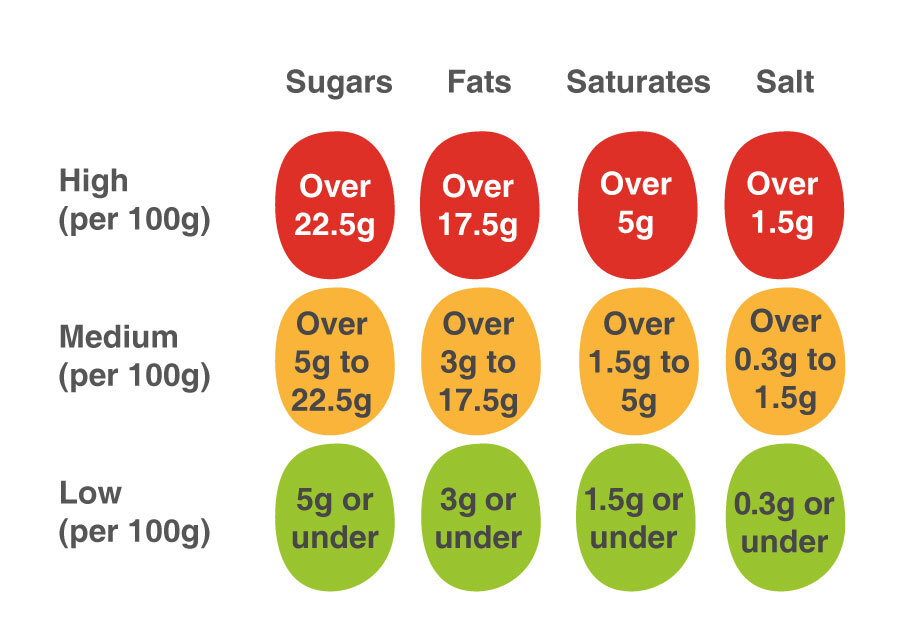
The UK, like many 1st world countries is getting fat. In the near future all major supermarkets in the UK will adopt 'traffic-light-labeling' in the near future.
Indeed there is some evidence that consumers find traffic light labeling useful in determining their food choices. Unfortunately there's currently no good way of aggregating all of the food choices you make together to demonstrate what you're eating like on a daily or weekly basis. Can you have that cheeky pizza or tub of ice cream without going over your calorific recommendations? How many greens equal a red?
There's a whole bunch of calorie tracking applications out there but they can be fiddly and I find that of the one's I've tried generally I end up manually inputting information about what I'm eating, this is time consuming and a real pain in the ass. This is because these apps need to know what products you're eating. They maintain a database somewhere that looks up EAN codes and hopefully returns you some useful information. This is where many apps in the UK fall down with only limited coverage of our millions of food and drink options.
I think the standardization of a traffic light style system is useful but unless you're very strict when shopping, it's difficult to know what ratio of green, amber and red makes sense.
Instead I suggest that supermarkets work to make the nutritional information about a product available in-store in a computer-readable way. Two obvious ways to do this are NFC and QR codes. The smartphone is ubiquitous and if nutritional information were trivially accessible it would be trivial to write apps that can accurately track your purchases. Applications could easily be created that look at this data over time, or look at whole-family purchases to busy parents make more informed decisions and understand better what their consumption patterns are really like.
I mention NFC and QR codes above, these could deployed in two ways - on products or on the shelf, this is a very cheap option as supermarkets are constantly changing and updating their labeling anyway. On products would be more expensive but has the advantage that users could scan their items at home, as they're consumed as well as the time of purchase.
Another benefit of presenting this information in a tech readable way is that it's easy to add a bunch more information than just traffic lights. You can add information on how many vitamins are provided in this product and allergy information too.
Tills could read this information so even if you didn't walk around with a smartphone at all the till could print out the nutritional information about your weeks shop on your receipt, even pointing out things that are on offer which would supplement your diet, of course they could do this when they look up the EAN codes but this requires lots of work, chatting with a product database etc the nice thing about presenting the information locally i.e on the products is that the calculating of nutritional information and ratios becomes simple.
Imagine walking around a supermarket, you've told the application on your phone that you're doing a weeks worth of shopping. The application knows that you're trying to loose weight, that you need a certain amount of protein in your diet and that you're allergic to nuts. As you walk around the supermarket each item is scanned as you put it in your basket. You get a little beep to let you know that the fancy bread you just put in may contain nuts and you get a readout telling you if your diet this week is going to be higher in fat than you'd like or if you need to go grab some chicken because it's low in protein. A good application would probably store your previous purchases in a database so that that it can show you trends over time. If products did have a QR code printed next to the traffic light label then it would mean that once you've done your shopping and returned home you could track what you're eating, as you eat it. That would allow you to do some really interesting analysis of your eating habits.
There's lots of scope here for a supermarket to create an app that does all this and in turn offers targetted adds, perhaps specific discounts etc - there's a lot that can be done.
I like the idea of having the information in the QR code because it means I don't need internet access on my phone and makes the technological requirements for understanding the nutritional value of an item very low. Camera + QR reader = Done. When you make something like this Cloud based you have to be able to connect (WiFi or 3G) download (IP/TCP Stack) and interpret data from the supplier. However, something that used the QR code to grab a link to some Cloud based resource would perhaps be more valuable to a supplier. Who would be interested to know that their items were getting scanned 100k times but only being purchased 10% of the time? - they need to look at their nutritional info. I think this is exciting as it would allow users to start driving nutritional requirements back up to suppliers in a very real way, rather than focus groups and surveys.
For me, I'd like nutritional information on packaging exposed in a way that my phone can interpret, then I can spend weeks writing an app to help me with my dieting rather than going for a run!
We put lots of trust in SSL and often it's miss-configured or the libraries we use don't check all that we'd expect.
Many python libraries fail open in the case of SSL errors and revocation lists aren't even installed in most Linux distributions by default and don't tell me this is because of OCSP, that's virtually never implemented outside of web browsers.
I started to question the diligence that was being performed by package maintainers who we trust with all our secrets - those who provide the installed CA Certificates that we can check the validity of certificates against.
I wrote a simple script that walks through a directory filled with certificates, parses them for CRL information, downloads it and looks to see if it's expired. The code is a little ropy but was written for a specific purpose.
I was surprised to find 6 different root CA's with expired CRLs. This means that if one of their subordinate issuing CA's has been compromised and revoked, I'd never know - in turn any of those CA's could continue to sign bad certificates that my system would honor (if it checked revocation in the first place).
This script could easily be modified to check websites certificates or similar but for now it serves my purpose.
and here's the output when run on a stock Ubuntu 11.10 machine:
ubuntu@server-1345473124-az-3-region-a-geo-1:~/CRL-Scrape$ python scrape.py /etc/ssl/certs/
signet_ca2_pem.pem has a CRL pca2.crl that expired on Jan 4 11:44:13 2008 GMT
b4f0b7e7.0 has a CRL LCRacraiz.crl that expired on Dec 19 18:08:57 2011 GMT
signet_ocspklasa2_pem.pem has a CRL klasa2.crl that expired on Jan 5 10:36:58 2007 GMT
3e223c08.0 has a CRL rootca.crl that expired on Jan 5 12:32:13 2008 GMT
signet_tsa1_pem.pem has a CRL klasa1.crl that expired on Aug 3 09:38:22 2006 GMT
signet_ocspklasa3_pem.pem has a CRL klasa3.crl that expired on Jul 1 10:56:24 2006 GMT
Perhaps we should look at weather signet should really be in this bundle of trusted Certificate Authorities?
A year or two ago I setup a number of Nessus servers monitoring a few /16 network blocks.
Now I find that generating reports doesn't work, it seems to be getting out-of-memory errors while attempting to perform XSL translations on the reports.
A while back I wrote a script that aggregates reports together from various Nessus servers and creates a single report. This is useful because you can have some sections of your 'production' network scanned with one profile and others with a second profile - the script can put it all together as a single report for the 'Production' network - mail stakeholders with summary information etc.
So luckily I can get around the OOM errors by slicing up my networks into smaller chunks and scanning separately and gluing back together afterwards automagically!
I suspect others are in a far crappier situation. I can't share the script here but will help people out who are trying to do the same thing, lots of people appear to be struggling with this:
There are a number of reasons why you don't want to do this, go and use GPG or something similar to perform your encryption.
That said, if you're in a situation where you have a secret that needs securing before transmission to a specific party and the only credential for the recipient you have is their SSH Public Key then read on...
To start with you're going to need OpenSSL and SSH installed, we need SSH to convert the keys and we'll perform the actual encryption using OpenSSL.
Use SSH to convert the normal public key into something more usable by OpenSSL:
Voila! Simple public key encryption using SSH keys.
Be aware that we are doing direct RSA encryption here, which means you can only encrypt very small amounts of data. Anything bigger will typically use a symmetric algorithm like AES for encryption and use RSA to protect the AES key.